

| 일 | 월 | 화 | 수 | 목 | 금 | 토 |
|---|---|---|---|---|---|---|
| 1 | 2 | 3 | 4 | 5 | 6 | 7 |
| 8 | 9 | 10 | 11 | 12 | 13 | 14 |
| 15 | 16 | 17 | 18 | 19 | 20 | 21 |
| 22 | 23 | 24 | 25 | 26 | 27 | 28 |
| 29 | 30 | 31 |
Tags
- Node.js 설치
- D2Coding
- SQL import
- StringBuilder
- 클래스 형변환
- 회원정보 수정
- Scanner 시간구하기
- StringBuffer
- if else
- 중첩 if
- JSP 실습
- SpringSecurity 로그인
- jdk 설정
- System클래스
- SpringBoot
- if else if
- @PreAuthorize("isAuthenticated()")
- 별찍기
- 증감 연산자
- SpringSecurity 로그아웃
- 이클립스 설치
- Springsecurity
- MySQL workbench dump
- 스프링시큐리티 로그아웃
- 스프링부트 로그인
- SQL dump
- JAVA 변수
- 인텔리제이 Web 애플리케이션
- 접근제어자
- 중첩for
Archives
- Today
- Total
gi_dor
Spring Security 로그인 실패 시 에러메세지 SimpleUrlAuthenticationFailureHandler 본문
Back_End/SpringSecurity
Spring Security 로그인 실패 시 에러메세지 SimpleUrlAuthenticationFailureHandler
기돌 2026. 2. 23. 18:41
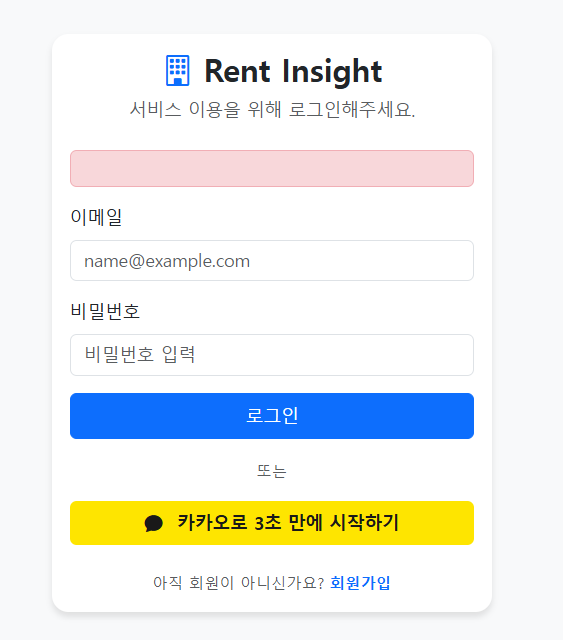
로그인과 회원가입 기능을 Security로 구현했지만 로그인에 실패하면 사용자 로그인이 왜 안되는지 알수 없다
로그인에 실패할 경우 사용자에게 안내 문구를 제공해 왜 로그인이 되지 않는지 명확히 알려주는 것이 필요하다고 생각했다
아무런 실패 처리가 되어있지 않고 있는 상태
  @Bean
    public SecurityFilterChain securityFilterChain(HttpSecurity http) throws Exception {
        http
                .csrf(csrf -> csrf.disable())
                .authorizeHttpRequests(authorize -> authorize
                        .requestMatchers("/", "/css/**", "/js/**", "/images/**", "/members/login", "/members/join").permitAll()
                        .requestMatchers("/members/mypage").authenticated()
                        .anyRequest().authenticated()
                )
                // 폼 기반 로그인 설정
                .formLogin(form -> form
                        .loginPage("/members/login")
                        .loginProcessingUrl("/members/login")
                        .usernameParameter("email")
                        .defaultSuccessUrl("/", true) // 로그인 성공 시 항상 메인 페이지로 이동
                        .permitAll() // 로그인 페이지 자체는 누구나 접근 가능
                )
                // 로그아웃 설정
                .logout(logout -> logout
                        .logoutUrl("/members/logout") // 로그아웃을 처리할 URL
                        .logoutSuccessUrl("/") // 로그아웃 성공 후 리다이렉트될 URL
                        .invalidateHttpSession(true) // 세션 무효화
                        .deleteCookies("JSESSIONID") // 쿠키 삭제
                );

        return http.build();
    }
failureHandler()- failureHandler() 메서드는 추가해야 예외를 캐치할수 있다
- 파라미터로 AuthenticationFailureHandler 인터페이스 구현체를 받는다고 한다
예외 처리를 위한 핸들러 - LoginFailHandler
로그인 실패에 대해서 관리하는 핸들러 AuthenticationFailureHandler 인터페이스를 구현함
- AuthenticationFailureHandler 인터페이스를 구현해야한다
- AuthenticationFailureHandler 인터페이스를 구현한 구현체인 SimpleUrlAuthenticationFailureHandler
public interface AuthenticationFailureHandler {

	/**
	 * Called when an authentication attempt fails.
	 * @param request the request during which the authentication attempt occurred.
	 * @param response the response.
	 * @param exception the exception which was thrown to reject the authentication
	 * request.
	 */
	void onAuthenticationFailure(HttpServletRequest request, HttpServletResponse response,
			AuthenticationException exception) throws IOException, ServletException;

}
@Override
public void onAuthenticationFailure(HttpServletRequest request, HttpServletResponse response,
AuthenticationException exception) throws IOException, ServletException {
if (this.defaultFailureUrl == null) {
if (this.logger.isTraceEnabled()) {
this.logger.trace("Sending 401 Unauthorized error since no failure URL is set");
}
else {
this.logger.debug("Sending 401 Unauthorized error");
}
response.sendError(HttpStatus.UNAUTHORIZED.value(), HttpStatus.UNAUTHORIZED.getReasonPhrase());
return;
}
saveException(request, exception);
if (this.forwardToDestination) {
this.logger.debug("Forwarding to " + this.defaultFailureUrl);
request.getRequestDispatcher(this.defaultFailureUrl).forward(request, response);
}
else {
this.redirectStrategy.sendRedirect(request, response, this.defaultFailureUrl);
}
}
public void setDefaultFailureUrl(String defaultFailureUrl) {
Assert.isTrue(UrlUtils.isValidRedirectUrl(defaultFailureUrl),
() -> "'" + defaultFailureUrl + "' is not a valid redirect URL");
this.defaultFailureUrl = defaultFailureUrl;
}
- SimpleUrlAuthenticationFailureHandler 를 사용한 EU
- setDefaultFailureUrl () 를 사용하기 위함
- 로그인 실패시 URL 을 지정 해준다
- setDefaultFailureUrl () 를 사용하기 위함
- onAuthenticationFailure 메서드를 오버라이딩해서 예외처리 , 에러메시지를 띄운다
- 한글 인코딩 깨지는 것을 방지 하기위해 UTF-8 처리 . URLEncoder.encode(errorMessage, "UTF-8");
@Configuration
public class LoginFailHandler extends SimpleUrlAuthenticationFailureHandler {

    @Override
    public void onAuthenticationFailure(HttpServletRequest request, HttpServletResponse response, AuthenticationException exception) throws IOException, ServletException {
        String errorMessage = null;

        if (exception instanceof BadCredentialsException) {
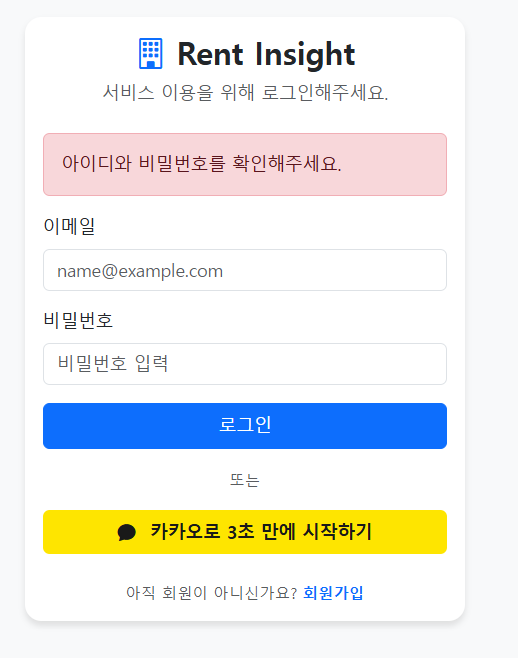
            errorMessage = "아이디와 비밀번호를 확인해주세요.";
        } else if (exception instanceof InternalAuthenticationServiceException) {
            errorMessage = "내부 시스템 문제로 로그인할 수 없습니다. 관리자에게 문의하세요.";
        } else if (exception instanceof UsernameNotFoundException) {
            errorMessage = "존재하지 않는 계정입니다.";
        } else {
            errorMessage = "알 수없는 오류입니다.";
        }

        errorMessage = URLEncoder.encode(errorMessage, "UTF-8");
        setDefaultFailureUrl("/members/login?error=" + errorMessage);
        super.onAuthenticationFailure(request, response, exception);

    }
}
super.onAuthenticationFailure(request, response, exception);실제 동작을 수행하는 부분 부모 클래스인 SimpleUrlAuthenticationFailureHandler의 기본 동작을 그대로 호출
this.redirectStrategy.sendRedirect(request, response, this.defaultFailureUrl);주소(defaultFailureUrl)로, 사용자에게 리다이렉트
RedirectStrategy 는 브라우저에게 defaultFailureUrl로 재접속하라는 명령을 내린다
- LoginFailHandler는 defaultFailureUrl을 /members/login?error=에러메시지로 설정
- super.onAuthenticationFailure(...)를 호출했음
- 1, 2, 3단계를 모두 건너뛰고, 마지막 4단계에 도달하여, 우리가 설정한 바로 그 URL로 리다이렉트를 실행시킨 것이다
위에서 말한대로
- setDefaultFailureUrl() 사용 → 로그인 실패 시, 다음에 이동할 URL은 /members/login?error=에러메시지
- onAuthenticationFailure() 오버라이딩
- URLEncoder.encode(errorMessage, "UTF-8"); 사용 완료
@Bean
public LoginFailHandler loginFailHandler() {
    return new LoginFailHandler();
}


// 폼 기반 로그인 설정
.formLogin(form -> form
        .loginPage("/members/login")
        .loginProcessingUrl("/members/login")
        .failureHandler(loginFailHandler())		// 로그인 실패
        .usernameParameter("email")
        .defaultSuccessUrl("/", true) // 로그인 성공 시 항상 메인 페이지로 이동
        .permitAll() // 로그인 페이지 자체는 누구나 접근 가능
)
<form th:action="@{/members/login}" method="post" th:object="${memberDTO}">
    <!-- 로그인 실패 시 에러 메시지 표시 -->
    <div th:if="${param.error}" class="alert alert-danger" th:text="${param.error}" role="alert">
        에러 메시지 표시
    </div>
</form>- param : 타임리프가 제공하는 객체
- error : setDefaultFailureUrl("/members/login?error=" + errorMessage); 에서 가져온 error
728x90
'Back_End > SpringSecurity' 카테고리의 다른 글
| Spring Security 로그인 / 로그아웃 (0) | 2026.02.22 |
|---|---|
| Spring Security와 BCrypt 해싱 (0) | 2026.02.04 |