

| 일 | 월 | 화 | 수 | 목 | 금 | 토 |
|---|---|---|---|---|---|---|
| 1 | 2 | 3 | 4 | 5 | 6 | 7 |
| 8 | 9 | 10 | 11 | 12 | 13 | 14 |
| 15 | 16 | 17 | 18 | 19 | 20 | 21 |
| 22 | 23 | 24 | 25 | 26 | 27 | 28 |
| 29 | 30 | 31 |
Tags
- JSP 실습
- jdk 설정
- Springsecurity
- 스프링부트 로그인
- @PreAuthorize("isAuthenticated()")
- 인텔리제이 Web 애플리케이션
- 중첩for
- 중첩 if
- System클래스
- SQL dump
- 이클립스 설치
- 별찍기
- Scanner 시간구하기
- JAVA 변수
- Node.js 설치
- 회원정보 수정
- SpringSecurity 로그아웃
- 증감 연산자
- MySQL workbench dump
- SpringSecurity 로그인
- if else
- 스프링시큐리티 로그아웃
- 클래스 형변환
- SQL import
- D2Coding
- 접근제어자
- SpringBoot
- StringBuilder
- if else if
- StringBuffer
Archives
- Today
- Total
gi_dor
팝업 모달 & 24시간 보지 않기 with JS , Cookie 본문
개발 중인 미니 프로젝트는 만들어가는 단계 이므로 배포 이후 사용자가 미구현된 버튼을 클릭하고 안되는 기능이나
데이터가 없어서 작동하지 않는 검색조건이 있을수 있어 사용자가 사이트를 이탈하는 것을 방지하기 위해
메인 페이지 진입 시 '서비스 업데이트 로드맵'을 안내하는 팝업 모달 & 검색시 없는 데이터 안내문 ' 을 띄우기로 결정
다만, 매번 접속할 때마다 팝업이 뜨면 피로감을 줄 수 있으므로 '24시간 동안 보지 않기' 기능을 쿠키(Cookie)를 활용해 구현했음
기능 정의
- 사용자가 웹 사이트에 방문하면 공지사항 팝업이 나타난다
- 팝업 안에는 24시간 다시보지 않기 체크박스 있다
- 체크박스를 선택하지 않고 팝업을 닫으면 메인 페이지 재방문시 팝업 발생
- 체크박스 선택후 팝업을 닫으면 메인 페이지 재방문시 팝업 미 발생
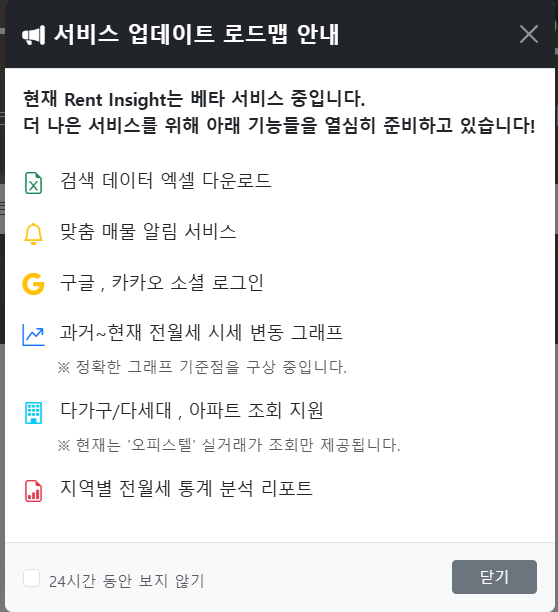

모달html
data-bs-dismiss="modal"Bootstrap이 제공하는 기본 닫기 기능onclick="closeNoticeModal()닫기 버튼 누를때 쿠키 생성 처리할 JS 함수
<!-- src/main/resources/templates/common/noticeModal.html -->
<!DOCTYPE html>
<html xmlns:th="[http://www.thymeleaf.org](http://www.thymeleaf.org)">
<div th:fragment="noticeModal">
    <div class="modal fade" id="noticeModal" tabindex="-1" aria-hidden="true">
        <div class="modal-dialog modal-dialog-centered">
            <div class="modal-content border-0 shadow-lg">
                <!-- 모달 헤더 -->
                <div class="modal-header bg-dark text-white">
                    <h5 class="modal-title fw-bold">
                        <i class="bi bi-megaphone-fill me-2"></i>서비스 업데이트 로드맵 안내
                    </h5>
                    <button type="button" class="btn-close btn-close-white" data-bs-dismiss="modal"></button>
                </div>

                <!-- 모달 바디 (로드맵 내용 생략) -->
                <div class="modal-body p-3">
                   <!-- ... 업데이트 예정 기능 목록 ... -->
                </div>

                <!-- 모달 푸터 (24시간 보지 않기) -->
                <div class="modal-footer d-flex justify-content-between bg-light">
                    <div class="form-check mb-0">
                        <input class="form-check-input" type="checkbox" id="hideFor24Hours">
                        <label class="form-check-label text-muted small mt-1" for="hideFor24Hours">
                            24시간 동안 보지 않기
                        </label>
                    </div>
                    <!-- 닫기 버튼 클릭 시 이벤트 발생 -->
                    <button type="button" class="btn btn-secondary btn-sm px-4" data-bs-dismiss="modal" onclick="closeNoticeModal()">닫기</button>
                </div>
            </div>
        </div>
    </div>
</div>
</html>
메인 페이지 html
<!-- src/main/resources/templates/index.html -->
<body>
    <!-- 1. 네비게이션 바 -->
    <nav th:replace="~{common/navbar :: navbar}"></nav>

    <!-- 2. 메인  영역 -->
    <main>

    </main>

    <!-- 3. 공지사항 모달 Fragment 삽입 -->
    <div th:replace="~{common/noticeModal :: noticeModal}"></div>

    <!-- 4. 푸터 -->
    <footer th:replace="~{common/footer :: footer}"></footer>

    <!-- Bootstrap JS (반드시 모달 제어 스크립트보다 위에 위치해야 함!!!!!!) -->
    <script src="[https://cdn.jsdelivr.net/npm/bootstrap@5.3.2/dist/js/bootstrap.bundle.min.js](https://cdn.jsdelivr.net/npm/bootstrap@5.3.2/dist/js/bootstrap.bundle.min.js)"></script>

    <!-- 모달 팝업 제어용 커스텀 JS 영역 -->
</body>
모달 팝업 JS
// 페이지 로드 다되면 쿠키 확인후에 팝업 출력 결정
window.onload = function () {
    // 쿠키 문자열에 'hideNotice=true'가 포함되어 있는지 검사
    if(document.cookie.includes("hideNotice=true")) {
        // 쿠키가 존재하면 아무 동작도 하지 않음 (팝업 숨김)
    } else {
        // 쿠키가 없으면 Bootstrap 모달 객체를 생성
        let noticeModal = new bootstrap.Modal(document.getElementById('noticeModal'));
        noticeModal.show();    // 화면에 표시
    }
}

// 닫기 버튼 클릭 시 동작
function closeNoticeModal() {
    let checkbox = document.getElementById('hideFor24Hours');
    if(checkbox.checked) {
        // 체크박스가 선택된 상태로 닫으면 유효기간 1일짜리 쿠키 생성
        setCookie("hideNotice", "true", 1);
    }
}

// 재사용 가능한 쿠키 생성됨
/**
 * @param {string} name - 생성할 쿠키의 이름
 * @param {string} value - 쿠키에 저장할 값
 * @param {number} days - 쿠키의 유효기간 (일 단위)
 */
function setCookie(name, value, days) {
    let todayDate = new Date();
    // 일(days) 단위의 시간을 밀리초(ms)로 변환
    let duration = days * 24 * 60 * 60 * 1000;

    // 현재 시간에 계산된 밀리초를 더하여 만료 시점을 설정
    todayDate.setTime(todayDate.getTime() + duration);
    let expires = todayDate.toUTCString();

    // 브라우저에 쿠키 저장 (path=/ 옵션으로 사이트 전체에서 쿠키 공유)
    document.cookie = name + "=" + value + "; expires=" + expires + "; path=/";
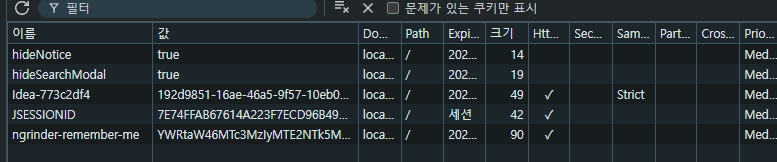
}- 페이지가 열릴때 JS에서 브라우저의 쿠키 저장소를 확인해 팝업그만보기 쿠키가 있는지 확인
( Ex. hideNotice ) - 팝업 결정 여부
- 팝업 생성
- 24시간 보지 않기 체크 후 닫기 누르면 JS는 브라우저에
hideNotice=true
- 24시간 보지 않기 체크 후 닫기 누르면 JS는 브라우저에
사실 여기까지는 해피엔딩이어씀
includes() 방식과 getCookie()의 필요성
예상치 못한 쿠키 이름 충돌에 매우 취약하다
예를 들어 테스트를 위해 추가된 쿠키 :do_not_hideNotice=true
이제 브라우저에 저장된 document.cookie문자열은 아래와 같은 형태가 된다"abcdCookie=true; do_not_hideNotice=true; sdaCookie=txxxxxxx; hideNotice=true"
이 상태에서, 페이지가 로드될 때 includes() 코드가 실행되면
- 코드:
if (document.cookie.includes("hideNotice=true")) { ... } - 동작 : JavaScript는 전체 문자열 안에서
"hideNotice=true"라는 텍스트를 찾는다 - 결과 :
"do_not_hideNotice=true"라는 문자열 안에 "hideNotice=true"가 포함되어 있으므로 해당 조건은 true를 반환
getCookie() 함수는 해당 문제를 해결할수 있다.
document.cookie문자열을 세미콜론(;)으로 쪼개어, ["...", "do_not_hideNotice=true"] 와 같이 각 쿠키를 분리- 정확한 시작점 확인:
("do_not_hideNotice=true")가 찾으려는 정확한 키와 등호("hideNotice=")로 시작하는지(indexOf(...) === 0)를 검사 "do_not_hideNotice=true"는 "hideNotice="로 시작하지 않으므로 무시된다- 오직 정확히
"hideNotice=true"라는 조각을 찾았을 때만 값을 반환
왜 getCookie()를 사용해야 하는가?
includes(): 빠르고 간편하다 (최고!) 다른 쿠키의 이름에 내가 찾는 문자열이 '포함'되는 경우 오작동할 수 있다getCookie(): 코드는 조금 더 길고 쿠키를 구분하고 정확한 매개변수를 기준으로 값을 찾아오므로 이름 충돌에서 안전
  window.onload = function () {
    if(!getCookie('hideSearchModal')) {
        let noticeModal = new bootstrap.Modal(document.getElementById('noticeModal'));
        noticeModal.show();
  }


// 쿠키 확인 함수
function getCookie(name) {
    let nameCookie = name + "=";
    console.log('nameCookie',nameCookie)    // "hideSearchModal="

    // (2) ['hideNotice=true', ' hideSearchModal=true']
    let splitCookie = document.cookie.split(';');
    console.log('splitCookie',splitCookie)

    for(let i = 0; i < splitCookie.length; i++) {
        let cookie = splitCookie[i];
        console.log('splitCookie[i]',cookie)    // hideNotice=true ,  hideSearchModal=true

        // 두번째 쿠키 부터는 앞에 ' hideSearchModal=true' 이런식으로 공백이있다
        while (cookie.charAt(0) === ' ') {
            cookie = cookie.substring(1, cookie.length);
            console.log('while cookie',cookie)
        }

        if (cookie.indexOf(nameCookie) === 0) {
            console.log('nameCookie.length',nameCookie.length)  // 16
            console.log('cookie.length',cookie.length)          // 20
            console.log('cookieString',cookie)                  // hideSearchModal=true
            return  cookie.substring(nameCookie.length, cookie.length);
        }
    }
    return null;
}
현재 내 무신사 사이트내 쿠키만 37개인데 막말로 문자열 같은 쿠키 있을수도 있잖아!!!!!!
728x90
'Language > JavaScript' 카테고리의 다른 글
| 04. Ajax (0) | 2024.01.17 |
|---|---|
| 03. DOM (0) | 2024.01.15 |
| 02. 이벤트 (2) | 2024.01.12 |